A triple screen sim racing setup uses three displays positioned around the driver to create a wider and more realistic field of view. This configuration helps racers see more of the track, improve spatial awareness, and experience a stronger sense of immersion during races.
This guide explains how triple monitor systems work, what specifications matter most, common setup mistakes to avoid, and how to create a racing environment that feels closer to a real cockpit experience.
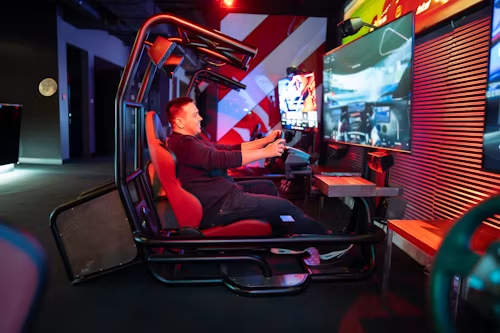
Why Triple Screens Change The Sim Racing Experience?
Single monitors can provide excellent image quality, but they naturally limit peripheral vision. Triple screens expand the visible environment, allowing drivers to see corner apexes, competitors, and track surroundings without constantly changing camera views.
One reason serious enthusiasts often invest in a best monitor for sim racing for triple-screen rigs configuration is that the wider visual coverage improves both realism and situational awareness.
Wider Field Of View And Spatial Awareness
A broader field of view helps drivers judge braking zones, corner entry points, and nearby traffic more accurately. This can improve consistency during long racing sessions.
Triple screens also reduce reliance on virtual mirrors and artificial camera adjustments, creating a more natural driving perspective.
Improved Corner Visibility And Racing Consistency
Seeing deeper into corners can improve confidence and help drivers maintain smoother racing lines. Small visual advantages often translate into more consistent lap times over long races.
While field of view is important, selecting the right display specifications is equally critical.
Choosing The Right Display Configuration
Not every monitor works equally well in a triple-screen environment. Matching specifications across all three displays creates a more seamless experience.
Many racers researching how to choose a monitor for sim racing quickly discover that proper screen alignment, resolution matching, and viewing distance can be just as important as the panel itself.
Screen Size, Resolution, And Curvature
For most racing rigs, 27-inch to 32-inch displays provide a strong balance between immersion and practicality.
Common options include:
- 27-inch 1440p monitors
- 32-inch 1440p monitors
- Ultrawide alternatives
- Curved gaming monitors
- Flat-panel triple screen configurations
Larger screens increase immersion, but they also require more desk or cockpit space and greater graphics card performance.
Refresh Rate And Response Time Considerations
Smooth motion is particularly important in racing simulations where vehicles move at high speeds.
Among the most important key features of monitor for sim racing are:
- High refresh rates
- Low response times
- Adaptive sync support
- Consistent color performance
- Minimal input lag
Higher refresh rates help maintain visual clarity during fast transitions, while lower response times reduce ghosting and motion blur.
The display specifications matter, but physical installation determines whether the setup reaches its full potential.
Building A Stable Triple Monitor Racing Rig
Proper mounting and alignment can dramatically improve immersion.
Before investing in premium hardware, it helps to understand the practical aspects of setup, installation, and usage of monitors for sim racing because even high-end displays can feel awkward when positioned incorrectly.
Mounting And Alignment Tips
The center monitor should sit directly in front of the driver’s eye line.
Key recommendations include:
- Align monitor centers with eye level
- Maintain equal viewing distance
- Use sturdy monitor mounts
- Position side displays symmetrically
- Reduce bezel gaps whenever possible
Accurate positioning helps maintain visual continuity across all three displays.
Cable Management And Hardware Requirements
Triple-screen systems require additional planning compared with single-monitor setups.
| Component | Importance | Recommendation |
| Graphics Card | Very High | Modern mid-to-high-end GPU |
| Monitor Mount | High | Adjustable triple mount |
| Display Cables | Medium | Matching high-quality cables |
| Power Management | Medium | Surge-protected power strip |
| Cockpit Stability | High | Rigid racing frame |
A capable graphics card is particularly important because rendering three displays simultaneously places greater demands on system resources.
Proper hardware preparation makes it easier to avoid many common setup problems.
Common Triple Screen Setup Mistakes
Many racing enthusiasts focus exclusively on monitor specifications while overlooking setup fundamentals.
Incorrect Viewing Distance
Sitting too far from the displays reduces the immersive benefits of triple screens.
Common symptoms include:
- Reduced peripheral effect
- Lower sense of speed
- Less accurate depth perception
- Increased head movement
Maintaining a comfortable and consistent viewing distance creates a more realistic driving experience.
Poor Angle Calibration
Incorrect side-monitor angles often distort perspective and reduce visual continuity.
Many racers find that monitor stands, bezel-free kits, and other add-ons, integrations, and enhancements for monitor for sim racing help refine alignment and improve overall immersion.
Small adjustments can significantly improve the realism of a triple-screen cockpit.
Careful screen positioning, matching display specifications, and suitable hardware can resolve many of the practical concerns racers face when planning a triple-screen setup.
FAQs About Triple Screen Sim Racing Setups
These common questions address screen size, performance benefits, curved displays, hardware requirements, and the overall value of using three monitors for sim racing.
Is a triple screen setup better than a single monitor?
Yes. Triple screens generally provide a wider field of view and stronger immersion, particularly for racing simulations.
What screen size works best for triple monitor sim racing?
Most racers find 27-inch to 32-inch displays offer an excellent balance between immersion, space requirements, and performance.
Do triple screens improve lap times?
Not directly. However, improved visibility and spatial awareness can help many drivers become more consistent.
Are curved monitors better for triple screen racing?
Often, yes. Curved displays can create smoother transitions between screens and increase immersion.
What hardware is needed for triple monitors?
A capable graphics card, sturdy monitor mount, matching displays, and adequate cockpit space are typically required.
These answers provide a practical foundation for planning a triple-screen configuration that balances immersion, visibility, hardware demands, and available space.
Final Verdict
A well-configured triple screen setup can dramatically improve immersion, visibility, and overall racing enjoyment. When screen alignment, refresh rates, mounting, and hardware requirements are carefully considered, triple monitors deliver one of the most realistic sim racing experiences available outside of a real race car.